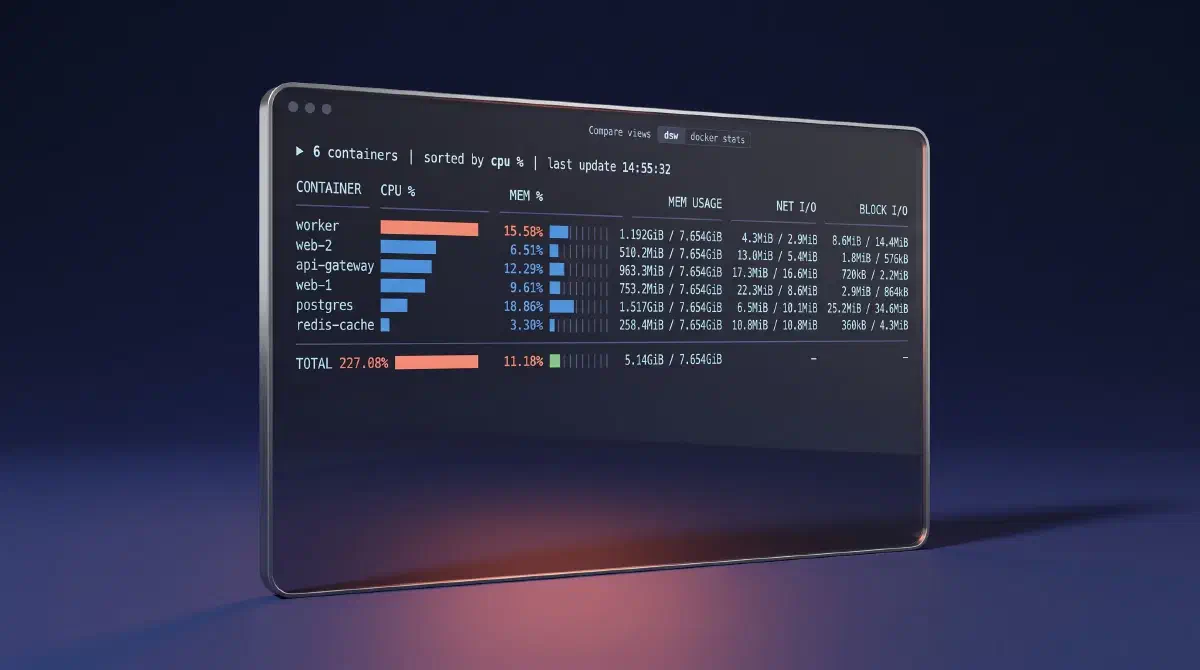
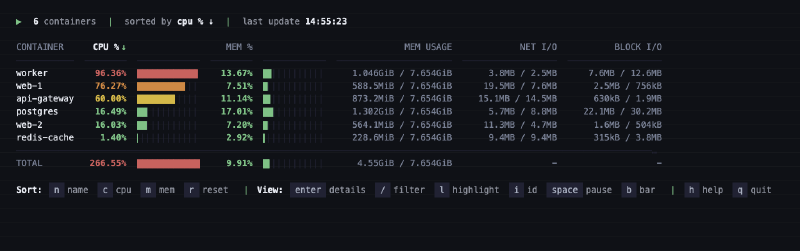
I run docker stats a lot. It gives you a live table of every running
container: CPU, memory, network, block I/O. It is also the same table every
time. You cannot sort it. You cannot filter it. Every row is the same color, so
the container eating a core looks exactly like the one doing nothing.
The usual answer is ctop. It’s good, but it takes over the terminal. It clears
the screen, and when you quit you get your prompt back and nothing else. I did
not want a container manager. I wanted docker stats with a better UI, printed
into the terminal I was already looking at: the commands above it left alone,
the last reading still on screen when I quit.
So I wrote dsw. It started as one 330-line file and with the help of Claude (duh!?) is now about 2,600 lines across six modules, with slightly more test code than source code. It imports nothing outside the Python standard library. That constraint shaped almost every interesting decision, and it was not free.
The dependency rule, and the bill for it #
Zero dependencies is easy to say when your program prints text. It gets
expensive at the edges. Take color. Emitting 24-bit color for the heat bars is
one f-string. But macOS Terminal.app does not do 24-bit color, and it does not
fail cleanly either. It mis-parses the sequence and you get garbage. With a
library you would ask a terminfo wrapper what the terminal supports. Instead
ansi.py checks COLORTERM at startup and, when it is not truecolor or
24bit, quantizes every palette color to the nearest xterm-256 index. That
means implementing the xterm 6x6x6 color cube and the 24-step grey ramp and
picking whichever is closer by squared distance, because greys look wrong on the
cube. Thirty lines to reproduce something a dependency would have handed me.
Same story with column widths. To pad a column you need the printable width of a
string, and that is not len(). ANSI escapes and combining characters take zero
cells; CJK characters take two. So there is a _char_width built on
unicodedata.east_asian_width, and a _visible_len that strips escapes first
and is lru_cached because it runs on every cell of every frame.
The clearest case was the config file. Adding a TOML config meant either taking
a dependency or raising the minimum Python from 3.10 to 3.11, where tomllib
is in the standard library. I raised the floor. Dropping 3.10 users is a cost,
and I paid it to keep the import list clean.
Data and rendering do not know about each other #
There are three long-lived threads: one reads docker stats, one reads the
keyboard, one draws. They communicate through state.py, which imports nothing
else from the package. It holds one dataclass, one lock, and a couple of
threading.Events.
The draw loop does not poll. It blocks on state.S.dirty.wait(). The fetcher
sets dirty when new rows land, the keyboard loop sets it on a keypress, and
that is the entire frame trigger. No FPS cap, no timer, because docker stats
already paces itself at about 1 Hz. _build_frame takes a width and a height
and returns bytes; it reads a snapshot and touches no state, which is why the
render tests are just string comparisons.
The part I got wrong first was the boundary between them. docker stats streams
rows forever with no marker for where one refresh cycle ends and the next
begins. dsw infers it: when a container ID repeats, the next cycle has started.
That works until you have exactly one container, where the duplicate arrives a
full second late. My first fix was two extra threads, a batch flusher and an
idle watchdog, both polling every 50ms. It worked and it was awful to reason
about: condition variables, generation counters, six threads.
The replacement reads the stats pipe with select() on the raw file descriptor
and yields None as a heartbeat when nothing arrives within 500ms. The consumer
handles both deadlines inline: flush a partial batch after 1.5 seconds, clear
stale rows after 3.5. Two threads gone, no synchronization primitives, and the
commit deleted 382 lines to add 294. No user-visible change at all.
Repainting a screen you do not own #
If you take over the screen, repainting is trivial: clear, draw, done. dsw refuses to do that, so every refresh moves the cursor up N rows and overwrites in place. That sounds simple. It broke three separate ways.
First, an off-by-one. Frames end on a blank line with no trailing newline, so after writing N rows the cursor is N-1 rows below the top. Moving up N overshoots by one every tick. On terminals without Warp-style blocks, the frame crept upward and overwrote one line of your terminal history per second. Not clearing the terminal was the whole point of the project, and I was quietly clearing it one row at a time.
Second, tall frames. If the frame is taller than the terminal, the terminal
silently clamps the cursor-up move and the display corrupts on every tick, with
no error. The fix drops chrome in order (key bar, totals, header), truncates the
rows, and prints ... N more. The totals still count every container, so the
number you read is still true.
Third, resize. On SIGWINCH the cached previous frame has rewrapped at the old
width, so both the “is this frame identical” check and the cursor-up count
describe a layout that no longer exists. The handler now flags a full clear.
None of these three exist if you call curses and own the screen.
What I would do differently #
Six days in I wanted a simpler variant, so I copied the program into
dsw-lw.py and started editing. It shipped as a second 771-line file. Two
months later it was 989 lines, had drifted from the original, and I deleted it.
The right way to try a variant is a branch. I knew that. I copied the file anyway because it felt faster on the day, and it was, for about six days.
dsw is on GitHub if you want it. Or do not install it, run docker stats and
notice how long it takes you to find the busiest container.